
Performance Lab Plugin Image Tests Results
See test results comparing images created with standard JPEG, MozJPEG, and then WebP images that were generated on upload using the new WordPress Performance Lab plugin.

My Recommendation
These tests prove to me that it is a bad idea to role this plugin’s image functions into WP core at this time.
READ: Why WordPress Should Not Enable WebP By Default for details on all of the issues this creates.
The full case study documentation is available to my Webmaster Training members and will be made available to the Measurement focus group of the WP Performance Team when that team is reformed and fully functioning.
Initial Setup
Following are details on the setup I used for these tests.
- Fresh WordPress 5.9.1 install
- Shared hosting with Litespeed server
- No other site/hosting optimization
- Default TwentyTwentyTwo theme
Media Settings
Following are the defaults in Settings > Media:
- Thumbnail size – 150×150
- Medium size – 300×300
- Large size – 1024×1024
Images Created
Since the Large size in WP Media settings is 1024, that was chosen as the width for the test image so that it could display properly as full size and the original would be used, not a thumbnail.
Below is a sample of the base image used for all tests:

The following images were created from the original:
- baseline-jpg-1024×724.jpg – no optimization prior to upload
- wpperf-jpg-1024×724.jpg – same as above, no optimization prior to upload
- moz-jpg-1024×724.jpg – same as above, optimized using Squoosh and saved as MozJPEG with these default settings

Online Testers Used
I chose to use online testers that anyone can easily have access to so they can replicate these tests.
WebPage Test
Used for desktop testing with these settings:

GTMetrix Mobile
I have the paid version of GTMetrix so that I can run mobile tests on it from a variety of locations and with a variety of settings.
These settings were used:

Google PageSpeed Insights
GPSI uses:
- A Moto phone – 4x slower than an iPhone
- Fast 3G connection – 2x slower than home wifi
- Fixed testing location – caches the test if same URL used repeatedly
I did not waste my time running this tester and here’s why:
- It’s not a real-world test for U.S. based site owners who cater to a U.S. based audience – and these make up the majority of my clients.
- It has nothing to do with the information reported to Google/Chrome about your site.
- It does not give the most detailed, accurate, or actionable information.
Baseline Tests
Following are the details of my baseline tests.
File Sizes of Uploaded Baseline Image
The baseline-jpg-1024×724.jpg image was uploaded directly to the Media Library.
Following are the images created by WordPress along with their file sizes as shown in the wp-content > uploads folder:

Order of Embedded Images
A new page was created and each size image was embedded in this order:
- Full Size – 1024×724
- Medium – 300×212
- Thumbnail – 150×150
- Full Size set to 75% – 768×543 – this is the only way to make this size thumbnail appear.
In other words, the original 1024×724 image was selected each time and the Image Block settings were changed to invoke the corresponding thumbnail image.

It’s important that the original, Full size image is the first to be embedded as it will display in the viewport (on the screen, above the fold). This avoids browser lazy load being applied to it.
This order was used for all tests.
Baseline Online Tester Results
Following are partial screenshots of my tests.
WebPage Test Baseline Results
Test results page: https://www.webpagetest.org/result/220403_BiDcEM_112/
NOTE: These tests are only held for a few months.
Median Run Speed Summary

Visual load start render and full render segments


Median run summary
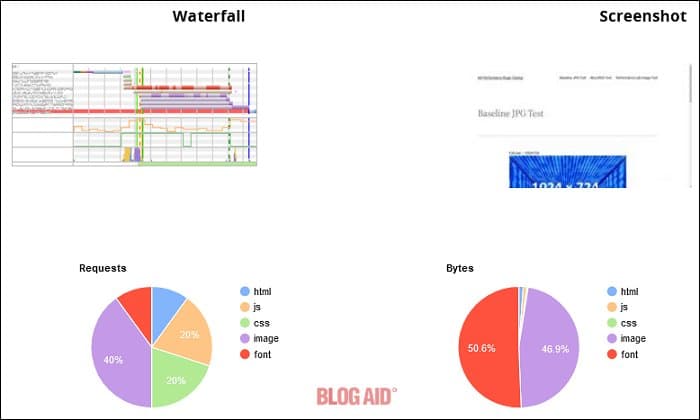
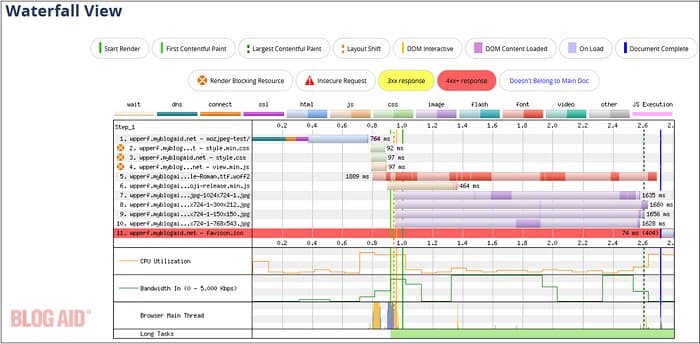
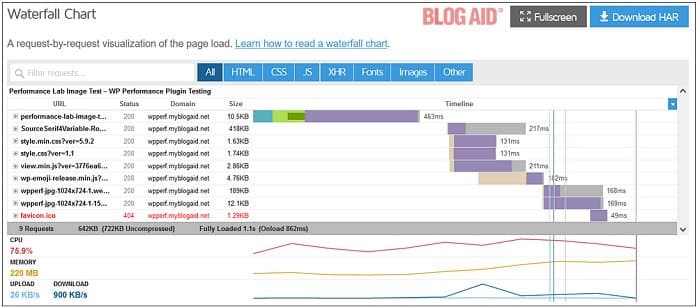
Waterfall
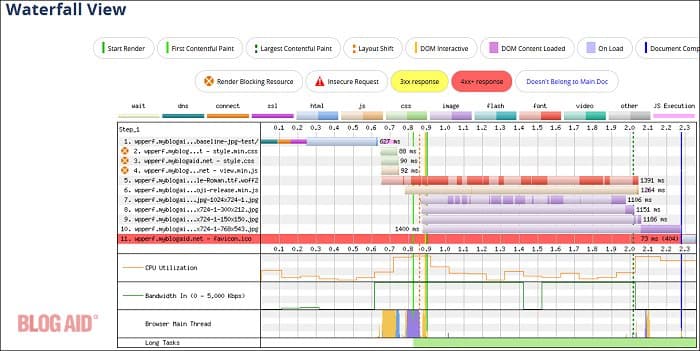
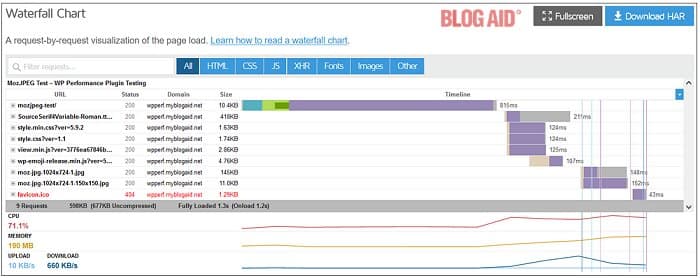
As you can see, the native font (long orange line) takes forever to load and the favicon is missing (red highlighted line). These are two issues I hope WP will address in this default theme to help with performance.
I chose to leave them as is so that everyone can replicate my out-of-the-box setup.
But, that also means that we have to ignore the fully loaded time in the results. And the font load impacts the start time of the images loading as well.
Third-Party Connections
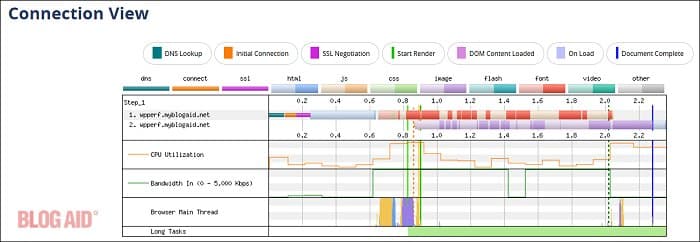
This Connection View remains the same throughout all tests and will only be shown once here, just to prove there are no external factors impacting the load.
Request Details
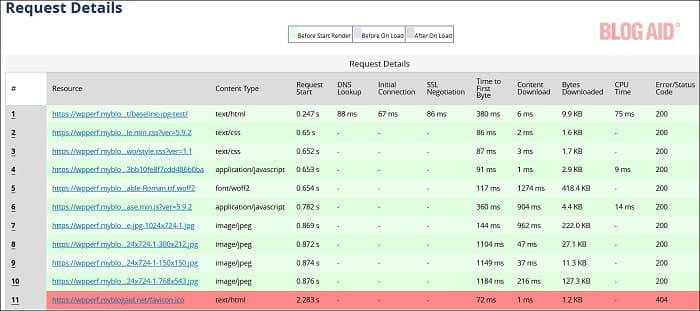
Request Headers
Request 1: https://wpperf.myblogaid.net/baseline-jpg-test/
Request 2: https://wpperf.myblogaid.net/wp-includes/blocks/navigation/style.min.css?ver=5.9.2
Request 3: https://wpperf.myblogaid.net/wp-content/themes/twentytwentytwo/style.css?ver=1.1
Request 4: https://wpperf.myblogaid.net/wp-includes/blocks/navigation/view.min.js?ver=3776ea67846b3bb10fe8f7cdd486b0ba
Request 5: https://wpperf.myblogaid.net/wp-content/themes/twentytwentytwo/assets/fonts/SourceSerif4Variable-Roman.ttf.woff2
Request 6: https://wpperf.myblogaid.net/wp-includes/js/wp-emoji-release.min.js?ver=5.9.2
Request 7: https://wpperf.myblogaid.net/wp-content/uploads/2022/04/baseline-jpg-1024×724-1.jpg
Request 8: https://wpperf.myblogaid.net/wp-content/uploads/2022/04/baseline-jpg-1024×724-1-300×212.jpg
Request 9: https://wpperf.myblogaid.net/wp-content/uploads/2022/04/baseline-jpg-1024×724-1-768×543.jpg
Request 10: https://wpperf.myblogaid.net/favicon.ico
Images
(Partial screenshots on large images)
Large image

Medium image

Thumbnail image

Large image at 75%

As you can see, all of the images are showing that they could be optimized more.
Except for the first one, they are all rendering Baseline, which is slower than Progressive render.
Plus, none of them are in a modern file format, which is something that Chrome/Google would prefer you use.
GTMetrix Mobile Baseline Test Results
Test results https://gtmetrix.com/reports/wpperf.myblogaid.net/ndtereWR/
NOTE: These tests are only held for a few months.
Mobile load screenshot

Test summary

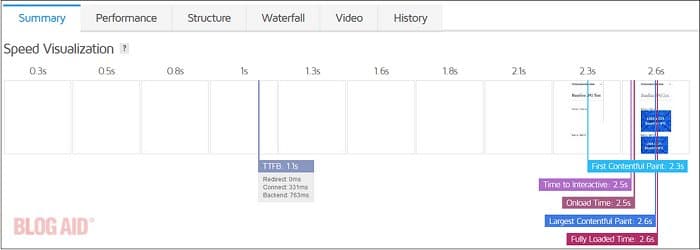
Speed visualization
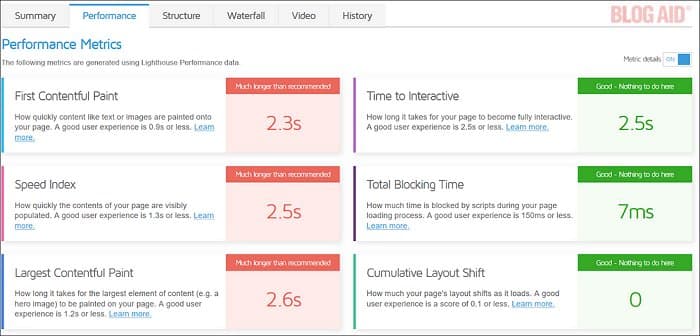
Performance metrics
Waterfall

MozJPEG Tests
The original image was saved as MozJPEG with the default settings in Squoosh and was uploaded directly to the Media Library.
File Sizes of Uploaded MozJPEG Image
Following are the images created by WP, including their file size, as shown in wp-content > uploads:
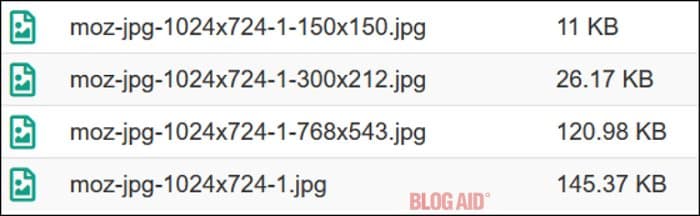
A new page was created and the images were embedded in the same order as the Baseline page.
MozJPEG Online Tester Results
This page https://wpperf.myblogaid.net/mozjpeg-test/
WebPage Test MozJPEG Results
Test results page: https://www.webpagetest.org/result/220403_AiDc6G_80D/
NOTE: These tests are only held for a few months.
NOTE: Only the most important stat screenshots will be shown for the rest of this post. The full case study is available to Webmaster Training members.

Images
Large image

NOTE: Progressive render on the full size image.
Medium image

NOTE: Baseline render on the thumbnails.
Thumbnail

Large at 75%

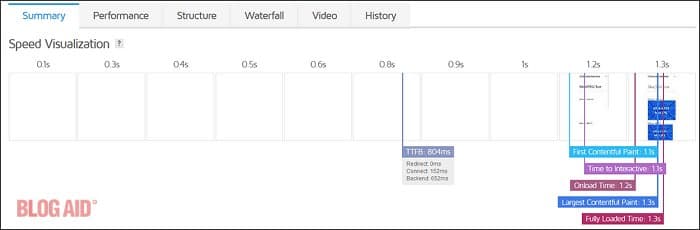
GTMetrix Mobile MozJPEG Results
Test results page: https://gtmetrix.com/reports/wpperf.myblogaid.net/bHFXR2tw/
NOTE: These tests are only held for a few months.
Mobile load screenshot



Performance Lab Tests
The Performance Lab plugin version 1.0.0-beta.3 was installed and configured with these settings:

File Sizes of Uploaded Images
Following are the images created by WP, including their file size, as shown in wp-content > uploads:

A new page was created and the images were embedded in the same order as the Baseline page.
Performance Lab Online Tester Results
WebPage Test Performance Lab Results
Test results page: https://www.webpagetest.org/result/220403_BiDcN1_7XF/
NOTE: These tests are only held for a few months.


Images
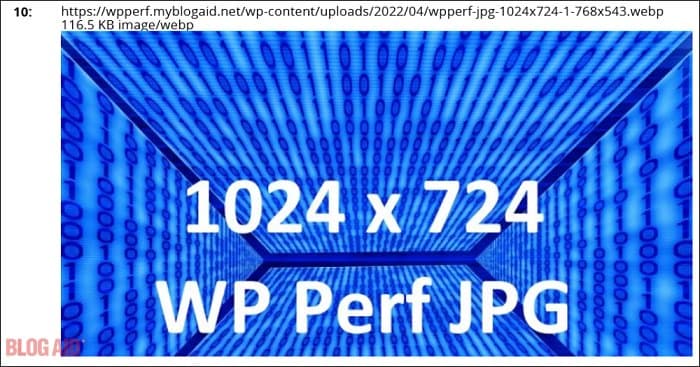
Large

Medium

Thumbnail

Large at 75%
GTMetrix Mobile Performance Lab Results
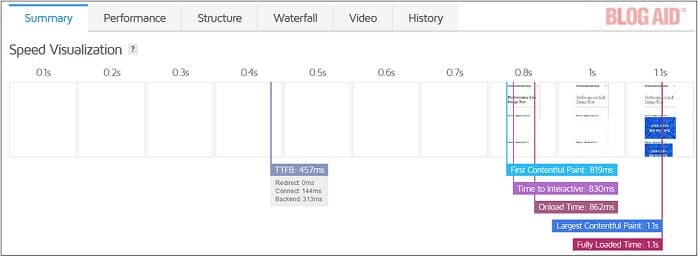
Test results page: https://gtmetrix.com/reports/wpperf.myblogaid.net/31cobvA3/
NOTE: These tests are only held for a few months.



Test Conclusion
Following is a summary of the tests.
Chart of Images Stored on Disk
The JPEG filename in the first column is for the baseline image and all of the thumbnails created. But the columns show each version’s file size for that equivalent image.
And below that are the original image sizes after upload, meaning the full size image.

Converting to WebP images gives an overall savings of 42.64 KB, even though some thumbnails are actually bigger than the original, unoptimized image.
However, the MozJPEG version gives an overall savings of 84.15 KB and the original plus all thumbnails are smaller than the original, unoptimized image.
Speed Comparison
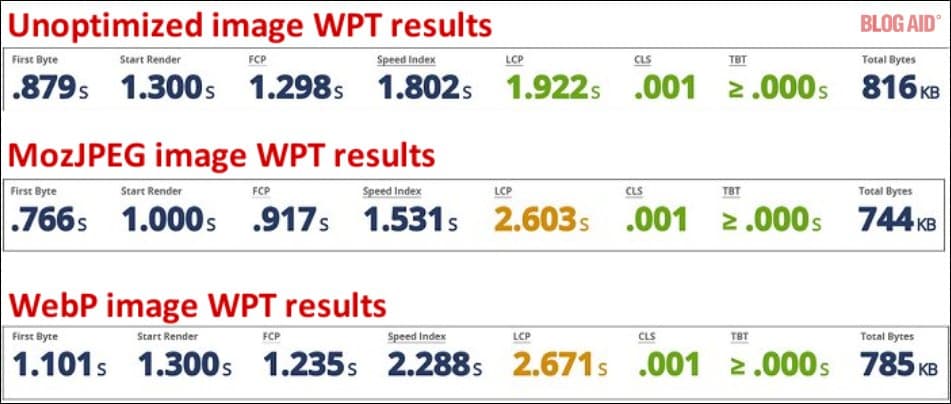
Even with losing the progressive render and modern file format of MozJEG on the thumbnails, it still outperformed the Performance Lab plugin in all respects, including:
- Load time
- Reduced file size
- Reduced number of files
- Reduced inodes
The MozJPEG extension is .jpg, is:
- supported in every browser and platform
- Requires no fallback image
- can be used in any 3rd party application such as RSS and email
I am not advocating that everyone use MozJPEG. It is just one example of a modern file format that works better than WebP.
Plus, newer image file formats with even better compression algorithms are on the way and we would not want to get locked into what will eventually become an older standard.

Thank you for the detailed test documentation. It seems odd to me that WP would choose to want to support a format that doesn’t meet its stated goals.
I agree. If this format is demonstrably slower, it seems like WP has missed its mark. And with the additional images and sometimes larger file sizes of WebP, it has a huge potential to chew up our hosting resources!
I’m ticked at all the time I had to spend doing these tests to publicly prove what so many of us voiced in the Performance Team already. There are serious concerns with the drawbacks of using this particular format – and it’s not even the fastest one, and it causes unnecessary bloat at the hosting level.
It’s mind boggling. And it’s not like plenty of folks on the Performance Team didn’t voice this very concern. The only reply has been that they’ll just serve up a fallback image. We can’t afford to double our image storage!!
Good grief, MaAnna. I’m with you on this 100%. WordPress’s plan to enable it by default makes ZERO sense to me.
It doesn’t make any sense to a LOT of folks and yet they keep pushing for it!